
 DOC
 Join our Discord
Modern FiveM Vehicle Garage System
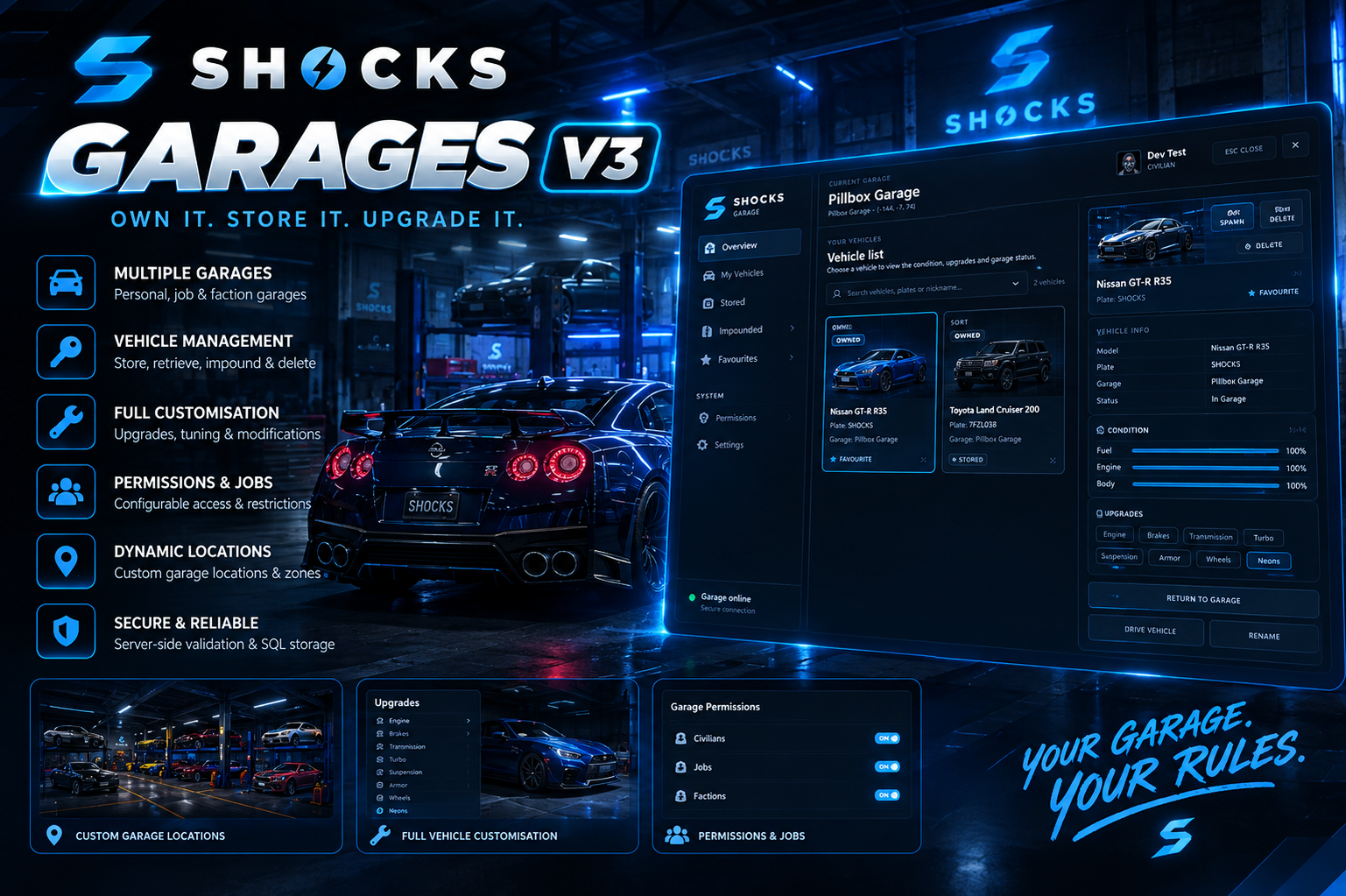
SHOCKS Garages V3.0.0 is a polished, configurable FiveM vehicle garage platform built for QBCore and Qbox/QBX servers.
The system provides persistent vehicle storage, a modern SHOCKS NUI, vehicle condition tracking, favourites, vehicle nicknames, ownership transfers, impound management, vehicle recovery, vehicle images, garage access restrictions, vehicle-out limits, key-system integration, housing integration, dealership compatibility and server-side validation.
It is designed to work with existing player_vehicles ownership data rather than forcing you to replace your existing vehicle database.
FRAMEWORK SUPPORT
SHOCKS Garages currently supports:
- QBCore
- Qbox / QBX
The framework can be selected manually or detected automatically.
Config.Framework = 'auto'
Supported values:
auto
qbcore
qbox
QBCore
Uses the QBCore player and vehicle APIs and falls back to the standard:
player_vehicles
database table.
Qbox / QBX
Supports the native Qbox vehicle path through:
qbx_core
qbx_vehicles
When qbx_vehicles is available, the garage uses the Qbox vehicle APIs for saving vehicle properties and ownership.
ESX
ESX is not supported.
REQUIRED DEPENDENCIES
The garage requires:
ox_lib
Used for:
- callbacks
- notifications
- vehicle properties
- model loading
- shared utility functionality
ox_target
Used for:
- garage access interaction
- vehicle parking interaction
- garage target zones
oxmysql
Used for:
- vehicle metadata
- garage persistence
- last-known vehicle locations
- favourites
- nicknames
- recovery tracking
- managed vehicle state
Framework
One of:
qb-core
or:
qbx_core
Qbox recommendation
Qbox servers should have:
qbx_vehicles
running for the native Qbox vehicle API path.
SERVER CFG INSTALLATION
Example QBCore setup:
ensure oxmysql
ensure ox_lib
ensure ox_target

ensure qb-core

ensure shocks_garage
Qbox setup:
ensure oxmysql
ensure ox_lib
ensure ox_target

ensure qbx_core
ensure qbx_vehicles

ensure shocks_garage
The garage should start after its dependencies.
DATABASE
SHOCKS Garages is designed to be additive.
It does not replace the normal:
player_vehicles
table.
The resource creates its own:
shocks_garage_vehicles
table.
This stores SHOCKS-specific garage information such as:
- vehicle nickname
- favourite status
- last known garage
- last known X/Y/Z position
- last heading
- last seen timestamp
- SHOCKS-managed OUT state
- active network ID
- active player source
The SQL installation file is:
sql/install.sql
Import it into the same database used by your vehicle ownership system.
VEHICLE OWNERSHIP
SHOCKS Garage works around the player's existing owned vehicle records.
Vehicles are identified using ownership data and plate information.
The garage validates that the vehicle actually belongs to the player before performing important operations.
This applies to:
- taking vehicles out
- storing vehicles
- renaming
- favouriting
- transferring ownership
- recovery
- impound interaction
- vehicle state changes
VEHICLE STATES
The garage supports the standard vehicle state model:
OUT       = 0
STORED    = 1
IMPOUNDED = 2
SEIZED    = 3
The active UI presents vehicles primarily as:
STORED
OUT
IMPOUNDED
A stored vehicle can only be retrieved from the garage where it is assigned.
MULTI-GARAGE VEHICLE FLEET
One of the major V1.8 features is the fleet view.
When a garage is opened, the player can see vehicles belonging to the current vehicle type across their fleet.
This means the NUI can show:
Vehicle A — Stored here
Vehicle B — Stored elsewhere
Vehicle C — Out
Vehicle D — Impounded
A vehicle stored at another garage is clearly marked:
STORED ELSEWHERE
It cannot be retrieved from the wrong garage.
The actual assigned garage is also displayed.
This makes it much easier for players to locate where their vehicles are stored.
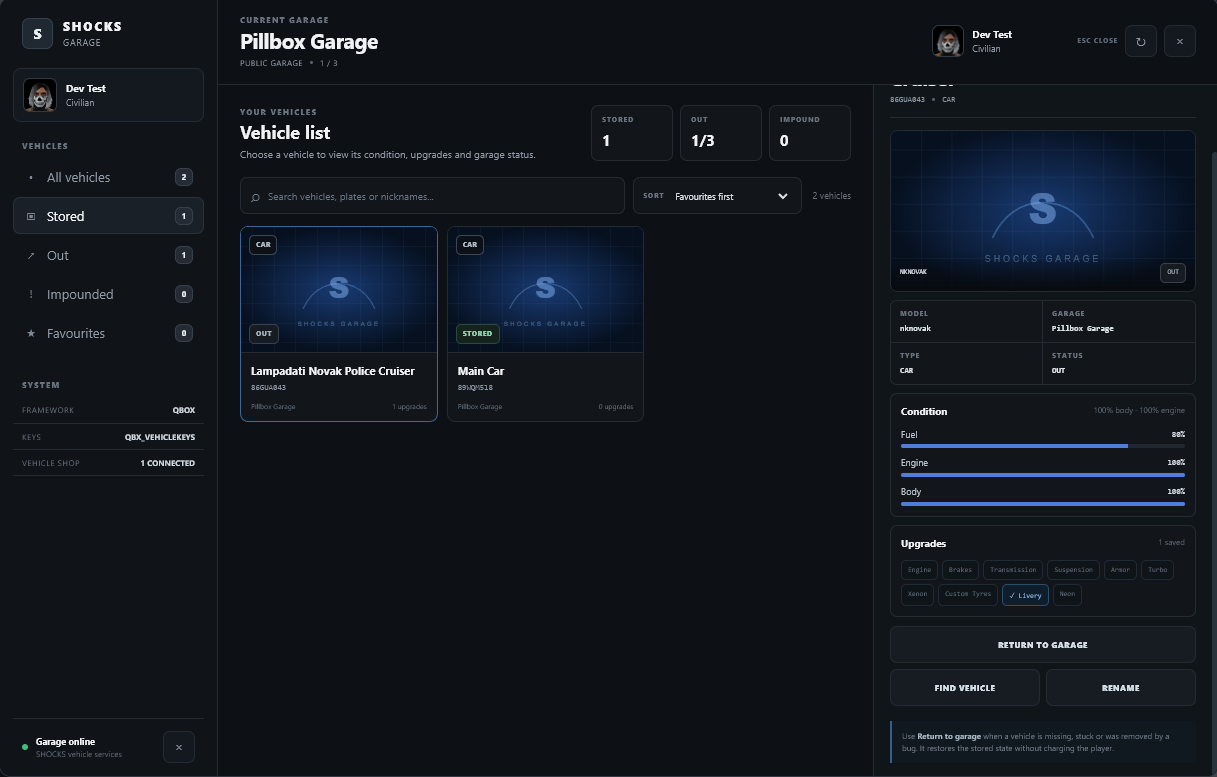
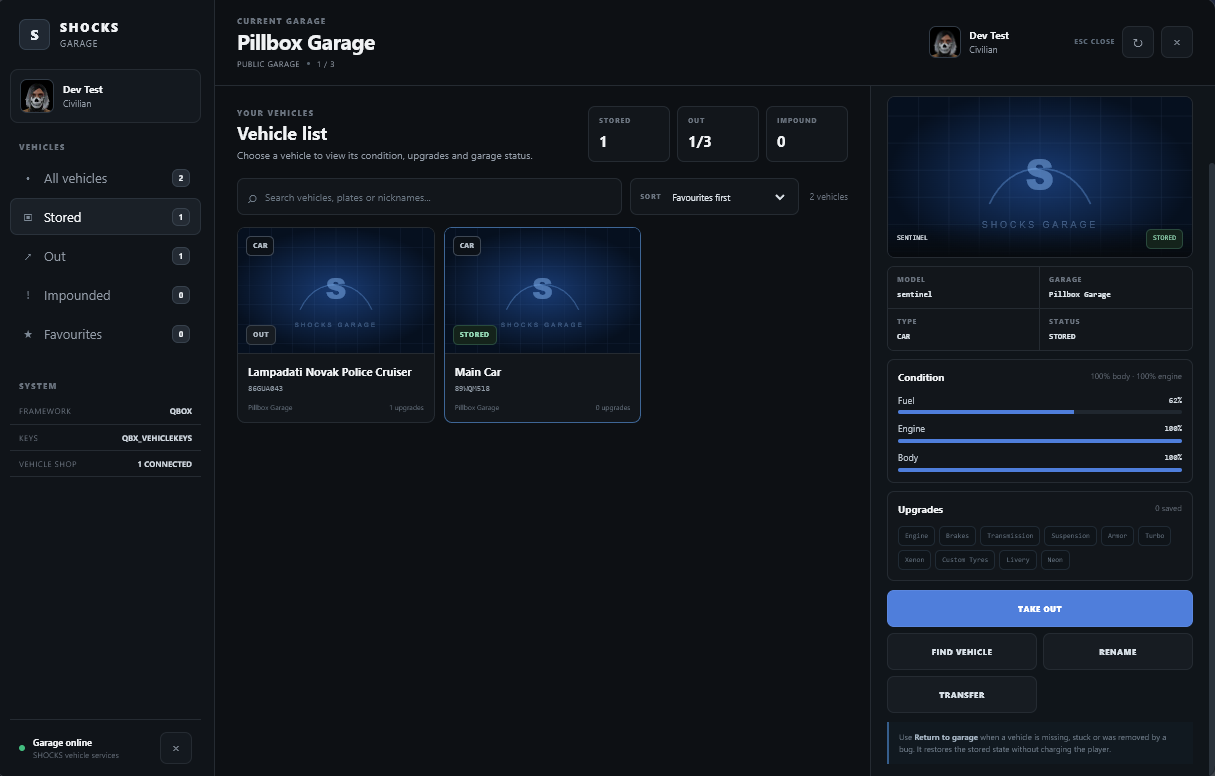
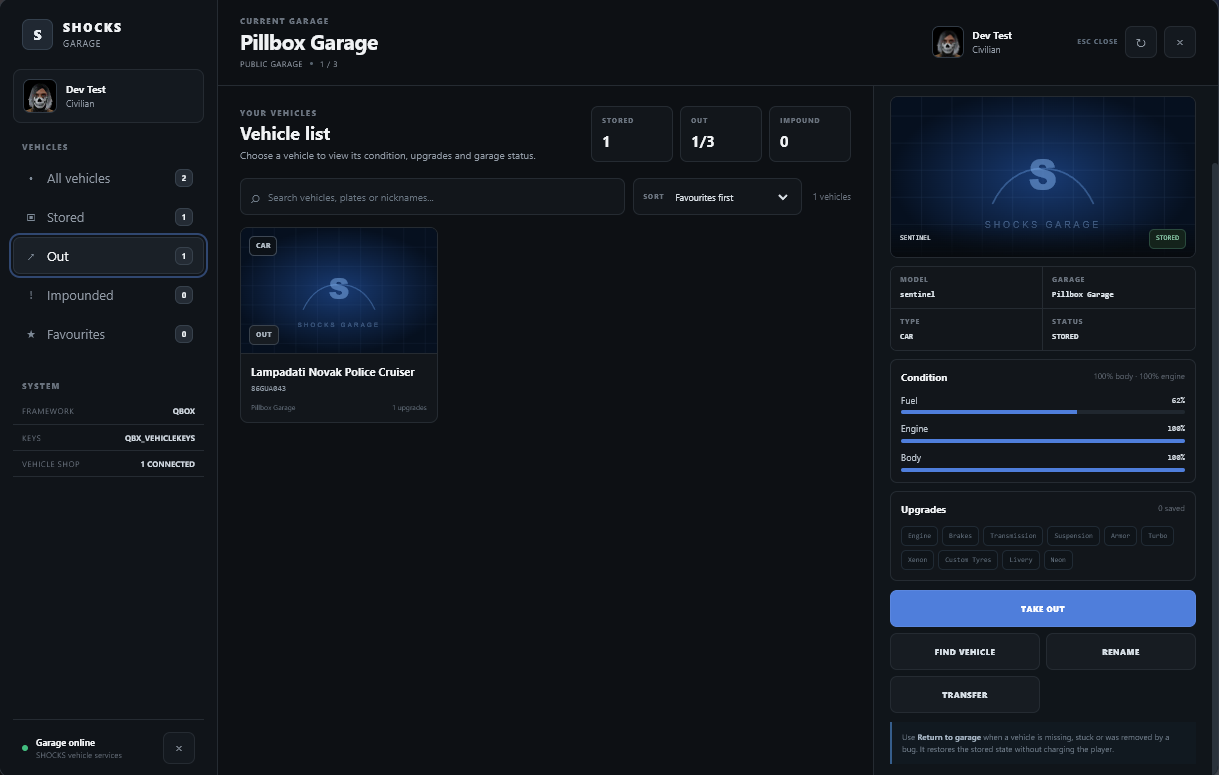
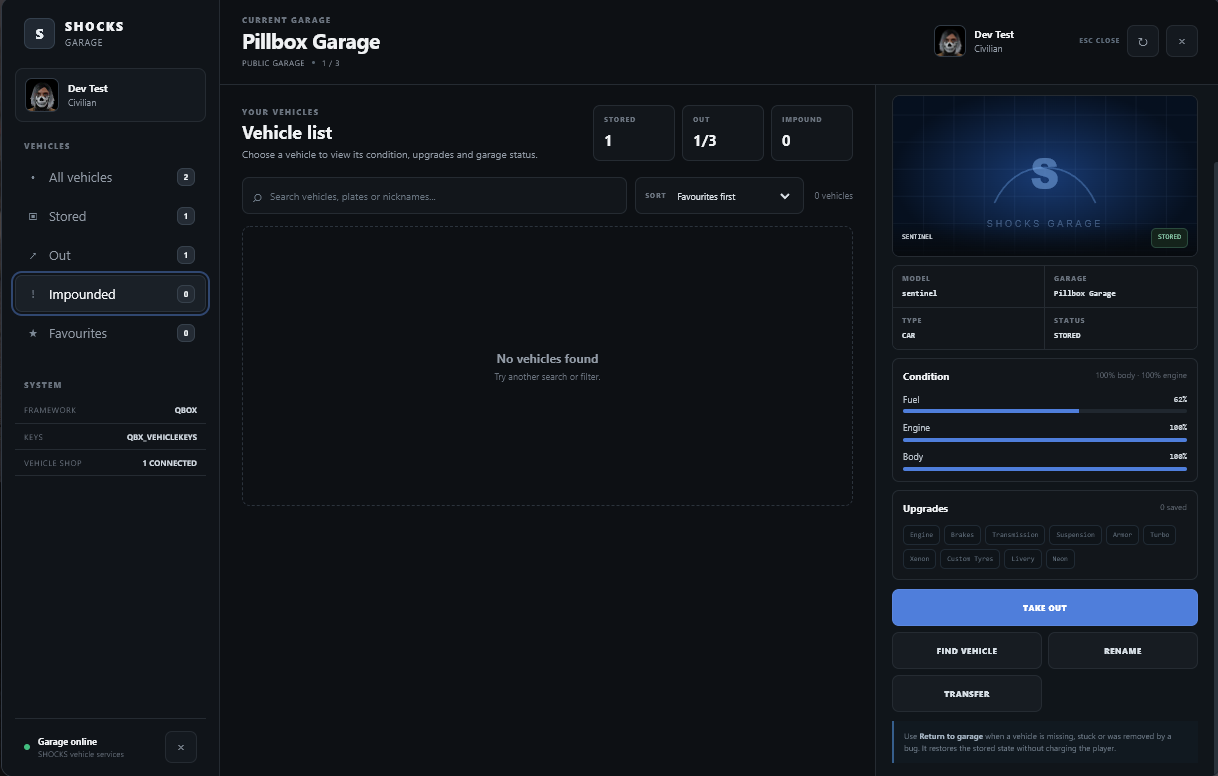
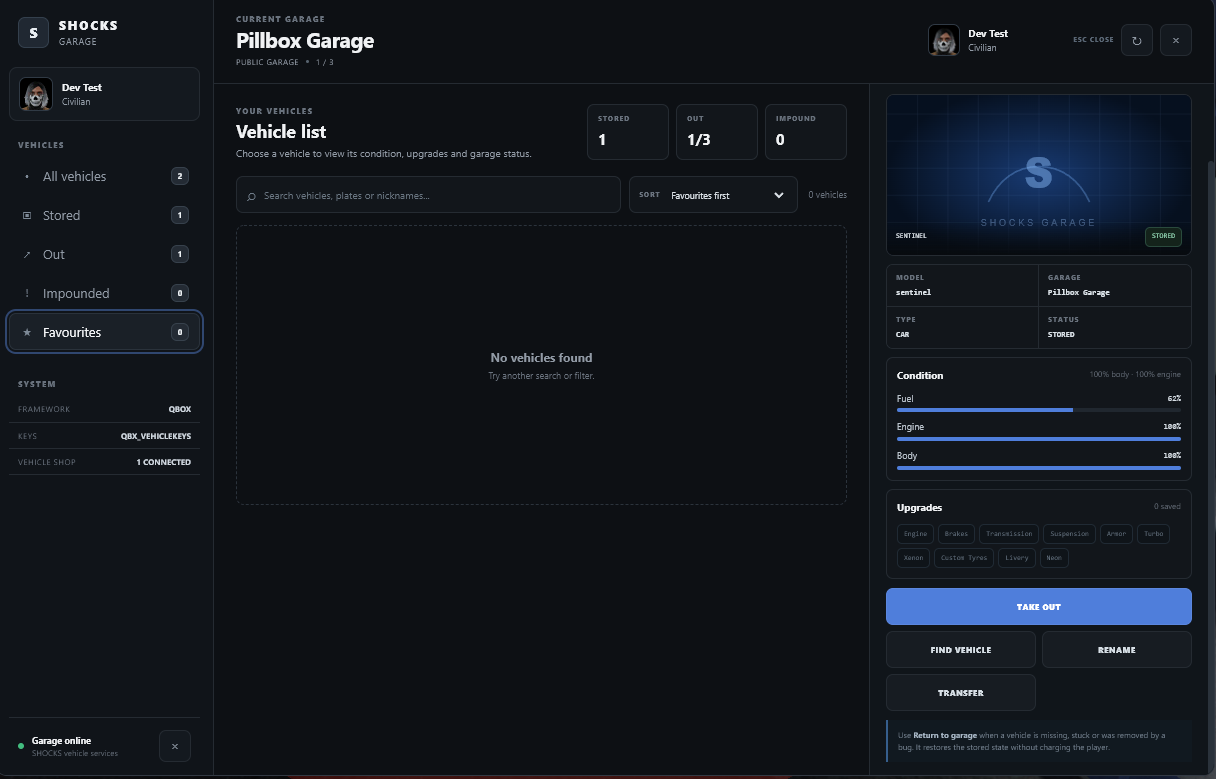
MODERN SHOCKS NUI
The garage includes a fully custom NUI rather than relying on a basic menu.
The interface includes:
- SHOCKS branding
- player profile
- player name
- player job
- current garage
- garage type
- fleet statistics
- vehicle filters
- vehicle search
- sorting
- vehicle cards
- vehicle images
- vehicle status
- vehicle details
- fuel condition
- engine condition
- body condition
- upgrade summary
- favourites
- nickname management
- vehicle transfer
- vehicle recovery
- impound release
- vehicle location finding
- refresh controls
- keyboard hints
The UI uses the SHOCKS dark blue visual style.
It is deliberately flatter and denser than older versions, reducing excessive gradients and decorative panels.
PLAYER PROFILE
When the garage opens, the system captures the player's current character ped headshot.
The profile area can display:
- character portrait
- character name
- job
- job label
The same player portrait can appear in the garage header and sidebar.
No external avatar hosting is required.
If the headshot cannot be generated, the interface automatically falls back to the SHOCKS S mark.
VEHICLE SEARCH
The NUI includes a live vehicle search field.
Players can search by:
Vehicle name
Plate
Nickname
Example:
Search vehicles, plates or nicknames...
This is particularly useful on servers where players own large vehicle collections.
VEHICLE FILTERS
Players can filter their fleet by:
All vehicles
Stored
Out
Impounded
Favourites
The UI also displays counts for each category.
VEHICLE SORTING
Players can sort vehicles by:
Favourites first
Vehicle name
Plate
Status
The default sort is configurable:
Config.UI.defaultSort = 'favorite'
VEHICLE CARDS
Each vehicle appears as a dedicated vehicle card.
Cards can display:
- vehicle image
- vehicle type
- favourite marker
- stored/out/impounded status
- nickname
- vehicle/model name
- number plate
- garage/location
- upgrade count
VEHICLE IMAGES
The garage supports custom vehicle images.
Images can be placed in:
nui/images/
Supported formats:
.png
.webp
.jpg
.jpeg
The garage automatically checks the vehicle's spawn/model name.
For example:
sultan.png
buffalo.webp
police.jpg
When no matching image exists, the default image is used:
images/default.svg
VEHICLE IMAGE OVERRIDES
Special vehicle names can be given custom image mappings.
Edit:
nui/vehicle-images.js
Example:
window.SHOCKS_VEHICLE_IMAGES = {
    default: 'images/default.svg',

    overrides: {
        'police2': 'images/lspd-interceptor.webp',
    }
};
The image system still uses the vehicle's spawn/model name as its primary identifier.
VEHICLE DETAILS
Selecting a vehicle opens the detail panel.
The panel displays:
MODEL
GARAGE
TYPE
STATUS
It also provides condition information.
VEHICLE CONDITION
The NUI tracks and displays:
Fuel
Displays the vehicle's current fuel percentage.
Engine
Displays engine health.
Body
Displays body health.
These values are obtained from the stored vehicle properties and/or the compatible vehicle database fields.
VEHICLE UPGRADES
The garage can inspect saved vehicle properties and identify common upgrades.
The UI can display status for:
- Engine
- Brakes
- Transmission
- Suspension
- Armour
- Turbo
- Xenon
- Custom tyres
- Livery
- Neon
The vehicle card also shows the number of detected upgrades.
VEHICLE PROPERTY PERSISTENCE
SHOCKS Garages uses:
lib.getVehicleProperties()
and:
lib.setVehicleProperties()
through ox_lib.
This allows the garage to preserve a broad range of vehicle customisation and condition data.
Depending on the vehicle and supported properties, this can include:
- model
- plate
- body health
- engine health
- fuel
- paint
- wheels
- wheel colour
- window tint
- xenon
- neon
- extras
- spoilers
- bumpers
- exhaust
- engine upgrades
- brake upgrades
- transmission
- suspension
- armour
- turbo
- custom tyres
- livery
- lightbar
- windows
- doors
- tyres
- related vehicle properties
When storing a vehicle, these properties are saved.
When retrieving it, the properties are applied back to the spawned vehicle.
VEHICLE STORAGE
Vehicles can be parked at configured garage drop points.
The default behaviour requires:
- a valid vehicle
- the player to be near the vehicle
- the vehicle to be within the parking zone
- the vehicle engine to be off, when configured
- the vehicle to be owned by the player
Default engine requirement:
requireVehicleEngineOff = true
VEHICLE DELETION ON STORAGE
When the vehicle has successfully been saved, the garage can delete the physical vehicle.
Default:
Config.Vehicle.deleteOnStore = true
On Qbox, the system attempts to use the Qbox vehicle deletion path.
Otherwise it falls back to the client deletion path.
This prevents the player from ending up with duplicate physical vehicles.
VEHICLE SPAWNING
When a player retrieves a vehicle:
- The server validates the garage.
- Vehicle ownership is checked.
- Vehicle state is checked.
- Vehicle type is checked.
- Vehicle-out limits are checked.
- A secure spawn token is generated.
- The vehicle is marked OUT.
- The client creates the physical vehicle.
- Saved vehicle properties are restored.
- Fuel is restored.
- The vehicle is tracked by SHOCKS.
- The server validates the spawned entity.
- Key access can be granted through the configured key provider.
The player can also be automatically warped into the vehicle.
Default:
warpIntoVehicle = true
SPAWN CLEARANCE
The garage checks for vehicles occupying configured spawn points.
If the spawn area is blocked, the vehicle is not spawned into an occupied location.
This prevents vehicles being created directly on top of other vehicles.
VEHICLE-OUT LIMIT
Servers can control how many vehicles a player may have OUT simultaneously.
Default:
Config.Limits = {
    maxVehiclesOut = 3,
    notifyOnLimit = true,
}
So, by default:
3 vehicles maximum OUT
Setting:
maxVehiclesOut = 0
makes the limit unlimited.
PER-GARAGE VEHICLE-OUT LIMITS
Individual garages can override the global limit.
Example:
maxVehiclesOut = 5
This allows a particular garage to have its own OUT capacity.
The server enforces the limit.
It is not merely a UI restriction.
GARAGE TYPES
SHOCKS Garages supports:
public
job
gang
house
impound
PUBLIC GARAGES
Public garages are available to everyone.
Example:
type = 'public'
No job or gang restriction is required.
JOB GARAGES
Garages can be restricted to jobs.
Example:
type = 'job',

jobs = {
    police = 0
}
Grade requirements can also be configured.
For example:
jobs = {
    police = 2
}
would require the configured minimum job grade.
GANG GARAGES
Garages can also be restricted to gangs.
Example:
type = 'gang',

gangs = {
    ballas = 0
}
This allows a dedicated gang garage.
HOUSE GARAGES
House garages can use the dedicated housing bridge.
The included example is designed for:
loaf_housing
Example:
housing = {
    provider = 'loaf_housing',
    propertyId = 'your-property-id',
}
The bridge checks the configured property's key holders before allowing access.
IMPOUND GARAGES
The garage supports dedicated impound facilities.
Example:
type = 'impound'
Impounds can contain:
- impounded vehicles
- configurable release fees
- configurable authorised jobs
- configurable access
DEFAULT IMPOUND FEE
The default configured impound release fee is:
Config.Fees.impound = 500
Players attempting to release an impounded vehicle are charged through the framework economy.
The system first attempts:
Bank
and then:
Cash
if required.
IMPOUND AUTHORISATION
By default, the configured impound system supports:
police
sheriff
statepolice
with configurable minimum grades.
ACE permission can also be used.
OWNERSHIP TRANSFER
Players can transfer ownership of a vehicle to another player.
The UI opens a SHOCKS transfer modal.
The player enters the target player's server ID.
The server validates:
- source player
- target player
- vehicle ownership
- target existence
- vehicle state
Vehicles that are currently OUT cannot be transferred through the normal transfer UI.
On successful transfer:
- vehicle ownership changes
- SHOCKS metadata ownership is updated
- nickname is reset
- favourite status is reset
- the target player receives a notification
VEHICLE NICKNAMES
Vehicles can be given custom nicknames.
Example:
Blue Comet
Work Truck
Police Interceptor
My Bike
Nicknames are saved separately from the base vehicle record.
Maximum nickname length:
40 characters
The rename system uses a custom NUI modal rather than the browser prompt() function.
FAVOURITES
Vehicles can be marked as favourites.
Favourite status is persistent.
Players can:
Add favourite
Remove favourite
Filter favourites
Sort favourites first
Favourite metadata is stored in the SHOCKS garage table rather than modifying the base vehicle schema.
FIND VEHICLE
The garage can retrieve the last saved vehicle location.
When a saved location exists, the system can place a waypoint on the player's map.
This can be used to help find an OUT vehicle.
The stored information can include:
X
Y
Z
Heading
Last garage
Last seen
MANUAL VEHICLE RECOVERY
One of the major V1.8 recovery features is:
RETURN TO GARAGE
This is intended for vehicles that are:
- missing
- stuck
- removed by
/dv - otherwise left in an incorrect OUT state
The player can select an OUT vehicle and choose:
RETURN TO GARAGE
The system then:
- Verifies ownership.
- Verifies the vehicle is actually OUT.
- Determines its assigned garage.
- Changes the vehicle to STORED.
- Removes SHOCKS tracking information.
- Deletes the tracked physical entity when available and configured.
- Refreshes the garage UI.
The vehicle returns to its assigned garage.
Default:
Config.Recovery.manualReturn = {
    enabled = true,
    allowFromAnyAccessibleGarage = true,
    deleteTrackedEntity = true,
    notify = true,
}
The recovery feature is intended as a controlled recovery mechanism rather than allowing arbitrary vehicle creation.
AUTOMATIC DESTROYED VEHICLE RECOVERY
SHOCKS Garage can monitor vehicles that it spawned itself.
If one is genuinely destroyed, the garage can return it to storage automatically.
Default:
restoreDestroyedVehicles = true
A configurable body-health threshold can also be used:
destroyedBodyHealth = 100.0
The garage only performs this tracking against vehicles spawned and tracked by SHOCKS Garage.
It does not scan every vehicle in the world.
DELETED VEHICLE RECOVERY
If a SHOCKS-tracked garage vehicle is deleted, it can also be returned to storage.
Default:
restoreDeletedVehicles = true
This is designed to handle situations such as:
/dv
vehicle deletion
entity removal
vehicle destruction
when the vehicle is one of the garage's tracked entities.
RESOURCE RESTART RECOVERY
SHOCKS Garage can recover its own managed OUT vehicles when the resource restarts.
Default:
resetOutVehiclesOnResourceRestart = true
The garage changes SHOCKS-managed OUT vehicles back to:
STORED
while preserving their existing garage assignment.
Importantly, the system uses its own managed_out tracking data.
This prevents the garage from indiscriminately resetting vehicles belonging to another garage resource that happens to use the same player_vehicles table.
RESOURCE STOP VEHICLE CLEANUP
Tracked SHOCKS-spawned vehicles can be physically deleted when the garage resource stops.
Default:
deleteTrackedVehiclesOnResourceStop = true
This helps prevent duplicate physical vehicles after a resource restart.
PLAYER DISCONNECT RECOVERY
The resource also has an optional player-disconnect recovery setting.
Default:
restoreOnPlayerDrop = false
It is intentionally disabled by default so servers that already have their own vehicle persistence/disconnect handling can keep control of that behaviour.
VEHICLE TYPES
Garage types can be assigned to different vehicle categories:
car
motorcycle
bicycle
air
sea
any
Examples:
Car garage
vehicleType = 'car'
Motorcycle garage
vehicleType = 'motorcycle'
Aircraft hangar
vehicleType = 'air'
Boat garage
vehicleType = 'sea'
Universal garage
vehicleType = 'any'
GARAGE ACCESS POINTS
A garage can contain multiple access points.
Each point can define:
- interaction coordinates
- interaction radius
- vehicle drop location
- one or more spawn locations
- blip settings
Example structure:
accessPoints = {
    {
        coords = vec3(...),
        radius = 2.2,

        drop = vec3(...),

        spawns = {
            vec4(...),
            vec4(...)
        },

        blip = {
            enabled = true,
            sprite = 357,
            color = 3,
            scale = 0.65
        }
    }
}
This allows large garages to have several spawn bays.
OX_TARGET INTEGRATION
The garage creates ox_target sphere zones for:
Open Garage
Players can interact with the garage access point.
Park Vehicle
Players can park a vehicle at the configured drop point.
The target interaction distance is configurable.
Default:
distance = 2.5
GARAGE BLIPS
Each garage can have an optional map blip.
Configurable:
sprite
colour
scale
enabled/disabled
This applies independently to each access point.
COMMAND ACCESS
The garage has a configurable command.
Default:
Config.UI.command = 'garage'
Players can therefore use:
/garage
The command searches for the nearest configured garage.
There is also a default key mapping:
F6
for opening the nearby SHOCKS Garage.
NUI CLOSE CONTROLS
The interface can be closed with:
ESC
There is also a configurable UI close key setting.
The garage properly releases NUI focus when closed.
VEHICLE KEYS INTEGRATION
Vehicle keys are handled through a bridge instead of being hard-coded directly into the garage.
The system supports configurable providers:
shocks
qbx
off
auto
Default automatic order:
autoOrder = {
    'shocks',
    'qbx'
}
Default supported resources include:
shocks_vehiclekeys
qbx_vehiclekeys
The garage can:
- detect the key provider
- grant vehicle access after spawn
- check key ownership
- remove keys through the bridge
- set vehicle lock state
The garage does not maintain a second independent vehicle-key database.
SHOCKS VEHICLE KEYS
The intended SHOCKS ecosystem pairing is:
shocks_vehiclekeys
The garage can automatically integrate with it when it is running.
QBOX VEHICLE KEYS
Qbox key resources can also be selected through the bridge.
The integration is controlled from:
shared/config.lua
HOTWIRE BRIDGE
Hotwiring is separated from the garage core.
The garage contains a bridge for:
shocks_hotwire
The intention is for the standalone hotwire system to own the actual hotwire gameplay.
This keeps garage functionality and hotwire functionality separate.
FUEL SUPPORT
Fuel is also bridge-based.
The garage can detect common fuel resources.
Default detection includes:
ox_fuel
LegacyFuel
cdn-fuel
ps-fuel
Renewed-Fuel
The system can also fall back to the native vehicle fuel level.
Fuel integration is configurable.
VEHICLE SHOP COMPATIBILITY
SHOCKS Garage does not attempt to replace dealership scripts.
Instead, it works at the owned vehicle record level.
This means supported dealership resources can create the vehicle ownership record and SHOCKS Garage can then display the vehicle.
Detected compatibility targets include:
qb-vehicleshop
qb-vehiclesales
qbx_vehicleshop
qbx_vehiclesales
okokVehicleShop
The garage can also display connected vehicle-shop status in the NUI.
VEHICLE SHOP PRINCIPLE
The dealership remains responsible for selling the vehicle.
SHOCKS Garage is responsible for:
ownership
storage
retrieval
garage assignment
vehicle state
vehicle properties
recovery
This separation allows the garage to coexist with other vehicle systems.
SECURITY / SERVER VALIDATION
SHOCKS Garage is heavily server-authoritative for important actions.
The server validates vehicle retrieval requests against:
- garage existence
- garage access
- player ownership
- assigned garage
- current vehicle state
- vehicle category
- vehicle-out limits
- spawn availability
- player existence
- spawn token
- network entity
- spawned vehicle plate
- spawned vehicle model
- spawn coordinates
SPAWN TOKEN SECURITY
Vehicle spawn requests generate temporary tokens.
The default lifetime is:
Config.Security.spawnTokenLifetime = 30
A token is associated with the player and vehicle request.
The server checks that token before accepting spawn confirmation.
SPAWN DISTANCE VALIDATION
The server also verifies the actual spawned vehicle is close enough to one of the configured spawn points.
Default:
maxSpawnDistance = 15.0
This prevents the client from claiming that a different vehicle was spawned somewhere else.
GARAGE DISTANCE VALIDATION
The garage checks player proximity before allowing normal garage interactions.
Default:
maxGarageDistance = 5.0
PARKING DISTANCE VALIDATION
The system validates that the parked vehicle is close enough to the configured drop point.
Default:
maxDropDistance = 8.0
EVENT RATE LIMITING
Garage vehicle actions are rate limited.
Default:
rateLimitMs = 350
This helps prevent rapid repeated server requests from being used to spam vehicle actions.
DATABASE SCHEMA SAFETY
The garage checks available columns in the existing vehicle database rather than assuming every installation has exactly the same player_vehicles schema.
This provides compatibility with different QBCore/Qbox vehicle schemas.
SHOCKS can work with optional vehicle fields such as:
fuel
engine
body
depotprice
state
where they exist.
GARAGE METADATA DATABASE
The separate:
shocks_garage_vehicles
table prevents SHOCKS-specific metadata from having to be inserted into the framework's core vehicle schema.
This is where features such as:
nickname
favourite
last location
last garage
managed OUT state
network tracking
are stored.
ADMIN PERMISSIONS
SHOCKS Garage has configurable administrator access.
Default ACE:
shocks.garage.admin
QBCore/Qbox-style permissions can also be configured:
allowQbPermissions = {
    admin = true,
    god = true
}
ADMIN COMMAND CONFIGURATION
The resource defines configurable command names for administrative garage functions:
locate = 'garageveh'
impound = 'garageimpound'
release = 'garagerelease'
These settings are intended to provide server-side administrative garage tooling.
IMPOUND ADMINISTRATION
Authorised staff can impound vehicles through the server-side garage system.
The default authorised jobs include:
police
sheriff
statepolice
ACE access can also be enabled.
EXTERNAL EXPORTS
SHOCKS Garage exposes exports for other resources.
Get a player's vehicles
exports.shocks_garage:GetPlayerVehicles(source)
Get a vehicle by plate
exports.shocks_garage:GetVehicleByPlate(source, plate)
Set a vehicle's garage
exports.shocks_garage:SetVehicleGarage(source, plate, garageId)
Impound a vehicle by plate
exports.shocks_garage:ImpoundVehicleByPlate(source, plate, fee)
Impound a vehicle
exports.shocks_garage:ImpoundVehicle(source, plate, fee)
Release a vehicle
exports.shocks_garage:ReleaseVehicle(source, plate, garageId)
These exports allow other SHOCKS resources, police scripts, dealership systems and administrative resources to communicate with the garage.
CONFIGURATION
The main configuration file is:
shared/config.lua
This allows the server owner to change the majority of the garage behaviour without editing the core client/server logic.
UI CONFIGURATION
Configurable UI options include:
showProfile
showSystemStatus
showGarageStats
showUpgradeSummary
showVehicleStats
showModelOnCards
showGarageType
showKeyboardHint
defaultFilter
defaultSort
cardColumns
compactCards
The UI can therefore be made more compact or more information-heavy depending on server preference.
GLOBAL FEATURE SETTINGS
The garage also provides configuration switches for:
favourites
nicknames
ownership transfer
vehicle finding
vehicle statistics
impound
financing information
plate search
live vehicle status
mileage
vehicle recovery
Important implementation note: the current V3.0.0 codebase actively implements and exposes the core garage functions around favourites, nicknames, transfer, finding saved locations, impound handling and recovery. Some of the broader feature flags such as financingInfo, plateSearch, liveVehicleStatus, and mileage are present in the configuration but are not currently wired into the NUI/server feature set in this package. They should therefore not be advertised as fully implemented V1.8 features unless they are added in a future build.
DEFAULT GARAGES INCLUDED
The configuration includes example garages for:
Pillbox
Pillbox Garage
Public
Car
Mission Row
Mission Row Police Garage
Job restricted
Police
Car
Ballas
Ballas Garage
Gang restricted
Ballas
Car
Sandy Shores
Sandy Shores Garage
Public
Car
Paleto Bay
Paleto Bay Garage
Public
Car
LSIA
LSIA Aircraft Hangar
Public
Aircraft
Puerto Del Sol
Puerto Del Sol Boat Garage
Public
Sea
SHOCKS Impound
SHOCKS Impound
Impound
Any vehicle type
Loaf Housing Example
A disabled example configuration is included for:
loaf_housing
with a replaceable property ID and coordinates.
All of these locations are examples and can be completely changed in:
shared/config.lua
GARAGE CUSTOMISATION
Each garage can independently configure:
- name
- type
- vehicle type
- job access
- gang access
- house access
- shared behaviour
- vehicle-out limit
- access points
- parking points
- vehicle spawn points
- blip sprite
- blip colour
- blip scale
- blip visibility
This makes it possible to create:
public garages
police garages
EMS garages
gang garages
business garages
house garages
aircraft hangars
boat garages
motorcycle garages
impounds
using the same resource.
PERFORMANCE DESIGN
The resource avoids scanning the entire game world for garage recovery.
Destroyed/deleted recovery monitors only vehicles that:
SHOCKS Garage spawned
This is significantly narrower than continuously scanning every vehicle around the server.
The client also uses adaptive waits for UI and recovery processing.
CLEAN RESOURCE STRUCTURE
The package is separated into logical components:
shocks_garage/
│
├── fxmanifest.lua
│
├── shared/
│   ├── config.lua
│   └── locales.lua
│
├── client/
│   ├── main.lua
│   ├── vehicle.lua
│   ├── target.lua
│   ├── nui.lua
│   └── house.lua
│
├── server/
│   ├── framework.lua
│   ├── vehicles.lua
│   └── main.lua
│
├── bridge/
│   ├── client/
│   │   └── keys.lua
│   └── server/
│       └── integrations.lua
│
├── nui/
│   ├── index.html
│   ├── style.css
│   ├── app.js
│   ├── vehicle-images.js
│   └── images/
│
├── sql/
│   └── install.sql
│
└── README.md
WHAT THE PLAYER CAN DO
From the player's perspective, the garage provides a central vehicle management system where they can:
Open a garage
View their fleet
Search vehicles
Filter vehicles
Sort vehicles
See vehicle images
See vehicle status
See garage location
See fuel
See engine condition
See body condition
See upgrades
Favourite vehicles
Rename vehicles
Take vehicles out
Park vehicles
Find saved vehicle locations
Return OUT vehicles to storage
Release impounded vehicles
Transfer eligible vehicles
WHAT THE SERVER OWNER CAN CONTROL
The server owner can configure:
Framework
Database table
Vehicle states
UI design
UI density
Garage locations
Garage types
Vehicle types
Job restrictions
Gang restrictions
House restrictions
Impound access
Impound fees
Spawn points
Parking points
Blips
Vehicle-out limits
Recovery behaviour
Destroyed vehicle recovery
Deleted vehicle recovery
Resource restart recovery
Vehicle deletion on storage
Fuel integration
Vehicle key provider
Hotwire provider
Admin permissions
Garage command
DESIGNED FOR SHOCKS ECOSYSTEM
SHOCKS Garages is designed to work alongside other SHOCKS resources rather than becoming a giant all-in-one vehicle script.
The architecture separates:
Garage storage
Vehicle keys
Hotwire
Fuel
Housing
Vehicle shops
Framework player data
into bridge/integration layers.
This makes the garage easier to maintain and reduces the chance of multiple resources trying to own the same vehicle state.
CORE SELLING POINTS
Modern UI
A professional SHOCKS interface designed to fit with other SHOCKS resources.
Persistent vehicles
Vehicle state and customisation are saved rather than treating vehicles as temporary spawned entities.
QBCore + Qbox
Designed for modern QBCore/Qbox servers.
Recovery system
Built-in manual and automatic recovery for SHOCKS-managed vehicles.
Anti-duplication design
Server-side ownership, state, entity and spawn validation.
Fleet management
Players can see their wider vehicle collection rather than only vehicles immediately stored at one location.
Configurable garages
Create public, police, gang, house, aircraft, boat and impound garages from the same configuration.
Integration friendly
Works through bridges with vehicle keys, fuel, housing and dealership resources.
Expandable
Includes exports for other resources to communicate with the garage.
IMPORTANT COMPATIBILITY NOTE
SHOCKS Garages is a FiveM GTA V resource.
It is not a RedM resource and does not target:
RDR2 / RedM
The current manifest specifically targets:
game 'gta5'
VERSION
Current package:
SHOCKS Garages V3.0.0
Resource name:
shocks_garage
The fxmanifest.lua identifies the package as:
SHOCKS Garage
Version 1.8.0
and the current configuration also reports:
Config.Version = '1.8.0'