
 DOC
 Join our Discord
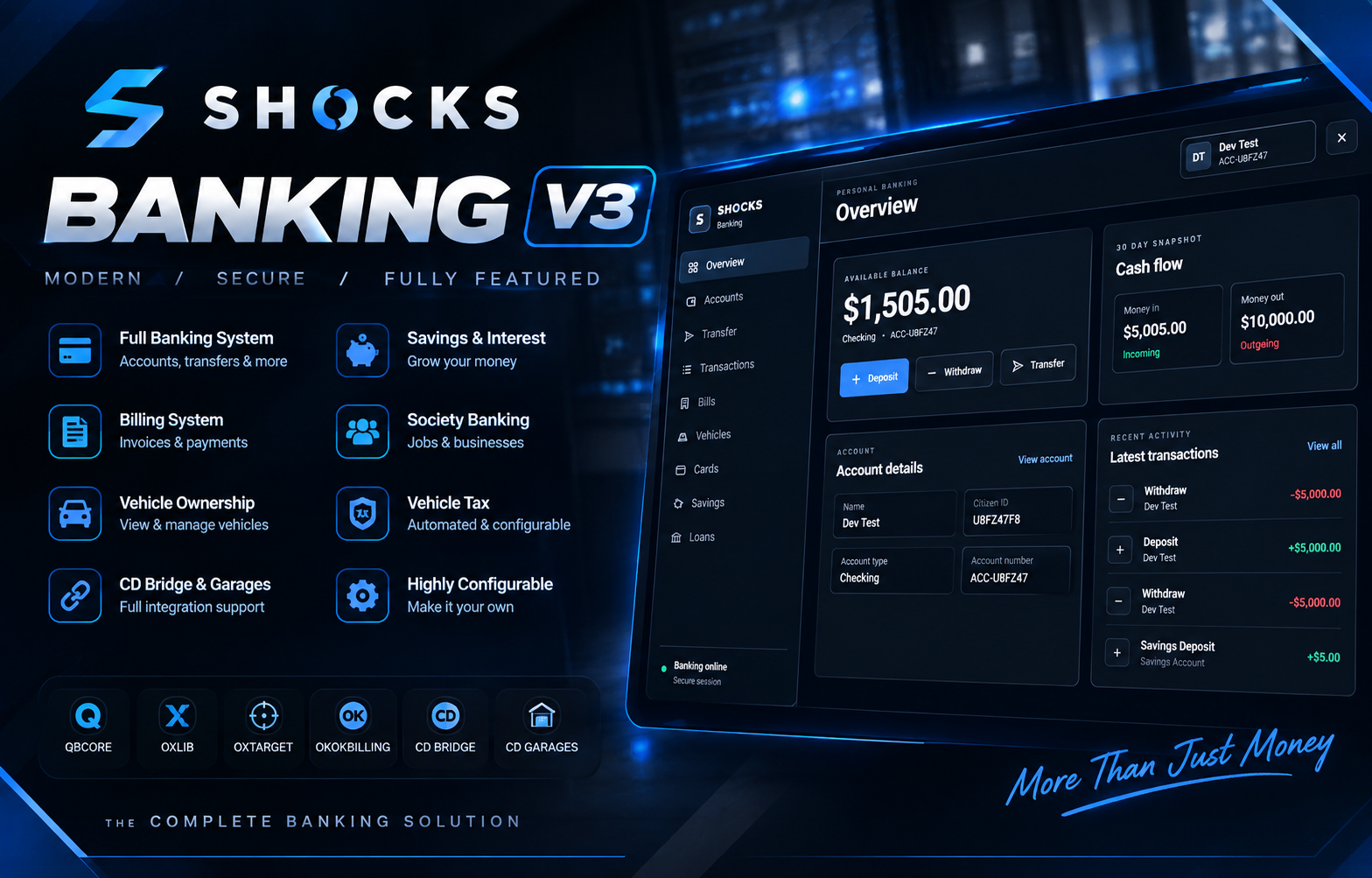
[SHOCKS] BANKING V3.3.0 — ADVANCED BANKING SYSTEM
A complete banking experience for FiveM. Built for customisation, shared accounts, business management and extensive integrations.
SHOCKS Banking V3 is a modern, feature-rich banking system designed to give your FiveM server a complete financial infrastructure. From personal accounts and savings to shared business accounts, invoice payments, vehicle ownership taxation and police fines, everything is managed through a modern, configurable banking interface.
With configurable integration bridges, extensive security controls and dedicated support for major roleplay resources, SHOCKS Banking is designed to integrate with your existing server economy without forcing you to rebuild every financial system from scratch.
💳 Personal Banking
🏦 Shared Accounts & Business Banking
💰 Savings & Interest
🧾 Invoices & Billing
🚔 Police Fine Payments
🚗 Vehicle Ownership & Tax
🔌 Extensive Integration Bridges
🎨 Customisable Banking NUI
💳 1. Core Banking System
Give your players a complete banking experience.
Deposit cash into bank accounts.
Withdraw funds from bank accounts.
Transfer money between players.
View account balances and transaction history.
Persistent player banking data.
Configurable transaction limits.
Configurable banking fees.
Fixed or percentage-based transaction charges.
Configurable transaction descriptions and reasons.
Server-side balance and payment validation.
Configurable banking notifications.
Modern, responsive banking interface.
Configurable banking commands and interactions.
🏦 2. Shared Accounts — Citizen ID Management
Create shared financial accounts for businesses, organisations and other roleplay groups.
Account creators retain control over membership.
Create and manage shared accounts.
Add players using their Citizen ID.
Validate the target character against the server's character records.
Remove members using the account creator's management controls.
Restrict member management to authorised account owners.
Configure shared-account permissions.
Support multiple members per account.
Configure account membership limits.
Track shared-account deposits and withdrawals.
Record membership changes in server logs.
Configure account creation requirements.
Support configurable account names and types.
Restrict financial actions according to account permissions.
Shared accounts are ideal for businesses, mechanic workshops, dealerships and other organisations that require controlled access to a common balance.
💼 3. Account Types
Configure your own banking structure.
Checking accounts.
Savings accounts.
Shared accounts.
Business and society accounts.
Configurable account names and labels.
Minimum and maximum balances.
Account-specific transaction limits.
Configurable transaction fees.
Optional maintenance charges.
Account-specific interest settings.
Configurable account creation rules.
💎 4. Savings & Interest
Give players more control over their finances.
Dedicated savings balances.
Savings deposits and withdrawals.
Configurable savings limits.
Minimum savings balance.
Configurable interest rates.
Account-specific interest settings.
Configurable interest intervals.
Minimum qualifying balances.
Maximum interest payouts.
Optional checking-account interest.
Optional savings-account interest.
Enable or disable the interest system.
Persistent savings information.
🏧 5. Banks & ATM System
Configure your banking network to match your server.
Configurable bank locations include:
Fleeca Bank — Legion.
Pacific Bank.
Additional custom bank locations.
Every location can have its own coordinates, heading, interaction distance, target zone and blip settings.
ATM configuration includes:
prop_atm_01prop_atm_03Additional configurable ATM models.
Custom interaction and target distances.
Configurable interaction labels and icons.
Optional bank-card requirements.
Configurable ATM behaviour.
Enable or disable individual ATM models.
Configure bank and ATM blips independently.
Supports ox_lib and ox_target integrations.
💳 6. Optional Bank Card System
Configure how players access ATMs and banking services.
Enable or disable bank-card requirements.
Configure the required inventory item.
Configure card restrictions.
Enable or disable ATM card requirements.
Configure card-related interaction behaviour.
Integrate the card requirement into your existing inventory setup.
📈 7. Vehicle Ownership & Banking
Bring vehicle information directly into the banking interface.
Display player-owned vehicles.
Read existing vehicle ownership records.
Display vehicle plates.
Display garage location.
Display vehicle status.
Display engine information.
Show total owned-vehicle count.
Configure which vehicle details are visible.
Refresh vehicle information.
Integrate with CD Garages where configured.
Vehicle information is designed to read from your existing ownership system rather than create a second, conflicting vehicle ownership database.
💸 8. Vehicle Ownership Tax
Introduce a configurable financial system for owned vehicles.
Charge tax based on owned vehicles.
Configure tax per vehicle.
Configure tax collection intervals.
Configure retry intervals.
Configure the payment account.
Set maximum tax amounts.
Configure exempt players or vehicles.
Enable or disable vehicle tax.
Automatically calculate tax from current ownership records.
Persist tax schedules.
Retry failed payments where configured.
Notify players about tax collections.
Record vehicle-tax transactions.
Display the next tax amount.
Display the next collection date.
Display tax status in the banking interface.
🧾 9. Built-in Billing & Invoices
A configurable invoicing system for your server's economy.
Create invoices for other players.
Receive invoices.
Pay invoices through SHOCKS Banking.
Support Citizen ID-based billing.
Configure invoice limits.
Configure invoice reason length.
Prevent self-billing.
Configure payment notifications.
Configure invoice notifications.
Record billing transactions.
Enable or disable built-in billing.
Configure invoice payment behaviour.
🔗 10. okokBilling Integration
Connect supported okokBilling payment flows to SHOCKS Banking.
Configurable okokBilling integration.
Invoice-payment bridge.
Bank deductions through the configured banking handler.
Optional cash fallback where supported.
Configurable society payment handling.
Invoice-payment notifications.
Billing transaction logging.
Configurable event and payment behaviour.
Third-party payment handlers must be configured to avoid charging the same invoice twice.
🏢 11. Society & Business Banking
Designed for player-owned businesses, job accounts and shared financial operations.
Society balance lookups.
Society deposits.
Society withdrawals.
Business account integrations.
Configurable society account names.
Configurable society account types.
Configurable society payment routing.
Transaction reasons and audit history.
Support for provider-specific banking bridges.
Configurable resource names and integration settings.
Banking Provider Bridges
The configurable bridge system covers the following banking ecosystems:
SHOCKS Banking society accounts.
QBCore
qb-banking.QBCore
qb-management.okokBanking.
Renewed-Banking.
FD Banking.
Wasabi Banking.
RxBanking.
Available operations depend on the selected provider and its installed version. Configure the provider that owns your live society balances rather than switching financial backends without migrating the relevant data.
🔌 12. Codesign CD Bridge Integration
Configurable Codesign integration support.
Optional CD Bridge integration.
Player banking integration where supported.
Society banking integration where supported.
Transaction integration where supported.
Configurable resource names.
Enable or disable the bridge independently.
🚗 13. CD Garages Integration
Connect supported CD Garage data to the banking interface.
Display owned vehicles.
Display vehicle registration plates.
Display garage locations.
Display vehicle status.
Display engine information.
Show vehicle counts.
Show garage slot information where available.
Refresh vehicle information.
Configurable garage resource name.
Optional CD Garage integration.
🚔 14. Police Fine Payments & Law Enforcement Integrations
Designed for police fines and financial enforcement workflows.
Wasabi Police Job V2
Configurable police fine-payment bridge.
Optional police society revenue handling.
Configurable payment routing.
Payment transaction logging.
Sentencing audit hooks.
Configurable police and prison resource names.
SHOCKS Police MDT
Configurable fine-payment exports.
Configurable minimum and maximum fine amounts.
Full-payment validation.
Optional society revenue routing.
Configurable police account name and account type.
Configurable transaction reasons.
Configurable webhook logging.
Sentencing audit integration.
Configurable MDT integration settings.
Important: Fine payments are handled through the configured payment bridge. Actual arrests, incarceration and sentence durations remain the responsibility of the installed police and prison resources. The relevant MDT or police handler must call the banking bridge and its sentencing audit hook at the correct points in the workflow.
📊 15. Transaction History
Keep a record of financial activity.
Deposits and withdrawals.
Player transfers.
Billing payments.
Society transactions.
Shared-account activity.
Vehicle-tax transactions.
Supported external integration transactions.
Configurable transaction categories.
Configurable transaction descriptions.
Configurable history length.
Persistent transaction records.
🔐 16. Security & Validation
Financial operations must be validated by the server.
Server-side money handling.
Balance validation.
Payment validation.
Transaction amount validation.
Ownership checks for shared-account management.
Configurable request rate limits.
Anti-self-billing protection.
Validation of financial requests.
Configurable transaction limits.
Server-side payment result checks.
Protection against invalid banking operations.
🔔 17. Notifications & Sounds
Configure how players receive financial feedback.
Deposit notifications.
Withdrawal notifications.
Transfer notifications.
Invoice notifications.
Payment confirmation.
Vehicle-tax notifications.
Error and success notifications.
Configurable notification type.
Configurable display duration.
Configurable notification behaviour.
Optional interaction sounds.
Optional notification sounds.
Configurable sound volume.
🎨 18. Modern NUI & Customisation
Make SHOCKS Banking match your server's identity.
Configurable brand name.
Configurable logo and brand text.
Primary, secondary and accent colours.
Background colours.
Window dimensions.
Currency symbol and currency code.
Number and decimal formatting.
Locale settings.
Quick-amount buttons.
Visible banking pages.
Navigation items.
Footer and status text.
Responsive banking layout.
🗃️ 19. SQL Persistence
Persistent financial data using oxmysql.
Banking tables.
Player account data.
Savings information.
Transaction history.
Vehicle-tax schedules.
Persistent banking records.
Configurable table names where supported.
Automatic table creation where configured.
Data retention across server restarts.
Always back up your database before installing an updated banking release or changing financial table settings.
📜 20. Commands, Webhooks & Administration
Configure the resource to suit your server's setup.
Configurable banking commands.
Enable or disable commands.
Configurable webhook URLs.
Individual webhook toggles.
Configurable webhook colours.
Deposit and withdrawal logs.
Transfer logs.
Billing logs.
Vehicle-tax logs.
Shared-account membership audit logs.
Configurable resource names.
Centralised integration settings.
⚙️ 21. Easy Configuration
SHOCKS Banking V3.3.0 is designed to keep the most important settings accessible through configuration files rather than requiring edits throughout the core code.
Configure:
Bank locations, ATMs and interactions.
Bank cards and account types.
Deposit, withdrawal and transfer limits.
Banking fees.
Savings and interest.
Shared-account membership and limits.
Society account providers.
Billing and invoice behaviour.
Police fine payment settings.
Police and prison integration names.
CD Bridge and CD Garages.
Vehicle ownership and tax.
NUI branding and theme.
Notifications and sounds.
Commands and webhooks.
Resource names and integration settings.
SQL table names where supported.
📦 Requirements & Compatibility
Core requirements and integrations
QBCore-based server setup.
ox_lib.
ox_target.
oxmysql.
Configured banking/society provider.
Optional CD Bridge and CD Garages.
Optional okokBilling.
Optional Wasabi Police Job V2.
Optional JG Advanced Garages.
Optional JG Dealerships V2.
Optional JG Mechanic.
Optional SHOCKS Police MDT.
The resource's actual compatibility depends on the framework bridge and installed third-party versions. Some external resources require their documented integration hook to be enabled; third-party resources are not included with SHOCKS Banking.
🚀 Why SHOCKS Banking?
One resource for your core banking experience, with configurable player accounts, shared accounts, savings, invoicing, vehicle taxation and integrations for your existing server economy.
SHOCKS Banking V3.3.0 — Your economy. Your configuration. Your banking system.